19,084 games • 153 updates this week • 4,739 users

Get To Work (TENOKE): Update v1.1.1.12
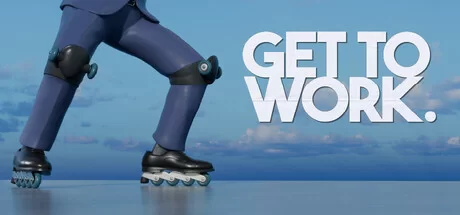
Get To Work (TENOKE): Update v1.1.1.12 cover art
4.3
...
User Verdict
Based on 38 community votes
  • TENOKE
  • Update v1.1.1.12
  • FREE DOWNLOAD
  • TORRENT
  • UPDATED
Support the developers by purchasing the gameGet it on Steam
Updated Version Update v1.1.1.12

About The Game

Get To Work is a challenging platformer centered around a young man looking to rise in the corporate world while mastering the art of roller skating. Armed with roller skates on his hands and feet, the protagonist must navigate a series of precise challenges that will test his skill and determination. The gameplay is constantly moving, requiring the player to maintain control while coping with the character’s relentless speed. There is dynamic narration from Connor CDawgVA Colhoun, whose commentary accompanies gamers throughout their journey.

Obstacles range from large chasms and steep ramps to tricky jumps, creating a balance between difficulty and strategy. Each level presents unique challenges for players, prompting them to adapt and refine their approach to overcome increasingly difficult scenarios. Get To Work incorporates elements of comedy and dark humor, combining corporate themes with absurd and exaggerated scenarios. As players progress, they encounter situations that reflect the protagonist’s struggle with the absurdity of capitalism and the desire to succeed. The combination of platforming mechanics and satirical storytelling makes every moment exciting and unpredictable.

NOTE. Uploaded version: 28 July 2025 [v1.1.1.6] + Update v1.1.1.12. This is Full Release and latest version of game. The game is already Packaged in ISO File and ready to run the game after install, read the instruction below.


System Requirements

Minimum:
Requires a 64-bit processor and operating system
OS: Windows 10/11
Processor: Intel Core i5-8250u
Memory: 8 GB RAM
Graphics: NVIDIA GeForce GTX 1650 or equivalent
Storage: 5 GB available space

Recommended:
Requires a 64-bit processor and operating system
OS: Windows 10/11
Processor: Intel Core i5 10400 3.1 GHz or AMD Ryzen 5 2600×3.1 GHz
Memory: 16 GB RAM
Graphics: NVIDIA GeForce RTX 2080 or equivalent
Storage: 5 GB available space

Screenshots

Get To Work (TENOKE): Update v1.1.1.12 gameplay screenshot 1
Get To Work (TENOKE): Update v1.1.1.12 gameplay screenshot 2
Get To Work (TENOKE): Update v1.1.1.12 gameplay screenshot 3

Gameplay Trailer

How to Install

  1. Download the Full game Get.To.Work.v1.1.1.6-TENOKE through torrent.
  2. Mount the Full ISO-image game in the «UltraISO».
  3. Install the game on you PC, wait for 100% installation.
  4. Copy all files of the folder «TENOKE» in game folder.
  5. Download and install Update v1.1.1.12, in game folder. (how to Update the game)
  6. Lock the game folder in the Windows firewall.
  7. Play!

Download update only: Get.To.Work.Update.v1.1.1.12-TENOKE, MIRROR [ 1.3 GB ]

  1. Extract.
  2. Run setup.exe and install the update.
  3. Copy crack to install dir.
  4. Play!

Download update only: Get.To.Work.Update.v1.0.4-TENOKE [ 345.1 MB ]

  1. Extract.
  2. Run Update\PATCH.exe and install the update.
  3. Copy crack to install dir.
  4. Play!

Download Get To Work (TENOKE): Update v1.1.1.12

SIZE: 5.45 GB | Downloads: —
How to get your file — 3 quick steps
VPN detected. Our download does not accept VPN connections. Please disable your VPN to continue.
Re-check
1
Click download
Use any button below
2
Install Opera
On the page that opens
3
Get your file
.torrent unlocks here
Download file
Switch to the tab that just opened — Opera installer is already there. After install, open this page in Opera and click Check install.
Opera not detected. Make sure it's installed and open this page in Opera browser, then click Check install again.
Opera is a free, official browser by Opera Software AS — safe to install. [ Opera Install Guide ]

Alternative Mirrors

Searching mirrors…
Name
Size
Seeds
Leeches

Game Update History

  • Get To Work v1.1.1.6 → Update v1.1.1.12 [ 22.01.2026 ]
  • Get To Work Build 16607885 → TENOKE RELEASE v1.1.1.6 [ 28.07.2025 ]
  • Get To Work → Build 16607885 [ 03.12.2024 ]
Rate This Game

Leave a review — how was the game?
Report issues — bugs, crashes, errors?
Ask questions — need help?
Your input makes the game better!

Comments 3

  1. MaGamers Offline 18 December 2024 10:42

    Patch 1.0.4
     
    Hello everyone!
    We're back with some updates to the game
     
    Audio Changes
    - Increased the baseline volume of ambient sounds in the game
    - Added better ambient sounds throughout the game
     
    Level Changes
    - Tweaking the power of the jump pads in "applying for jobs"
    - Adjusted some lights that were too bright in the warehouse section
    - Removed a duplicate slingshot in middle management
    - Adding some additional recovery in the Department Head Section, as well as when you become VP
    - Added new textures and fixed some lighting issues for the second ending
     
    - Closing seams in the geometry across all levels
    - Cleaning up some blurry textures
     
    German
    - Get to Work has now been translated into German

    --------------------
    Make a Small Donation ❤️
  2. MaGamers Offline 28 July 2025 07:03
    Tower Adjustments
    We've made some minor adjustments to the tower (mostly fixing geometry where players were getting soft locked). The tower remains mostly the same, and most players shouldn't notice the changes.
     
    Speedrun timer
    The Speedrun Community has requested we add a timer for the Doinkler Special, and as such, we've added a timer that is based on height!
     
    Quality settings
    We've added 3 quality settings (Low, Medium, High). These give very minor improvements to performance, but for those struggling to get good framerates in the main game, this should help a bit!
     
    Other Changes:
    Fixed a bug where the attempt counter would reset when opening level select multiple times.
    Removed "The Doinkler Special Competition" button in the title screen
    --------------------
    Make a Small Donation ❤️
  3. MaGamers Offline 22 January 2026 09:46

    Halving the Build Size and Bug Fixes
     
    Hello everyone!
     
    We've been quiet working on our next big project, but had the time to make some big updates behind the hood of the game.
     
     
    The Black-Screen Bug
    First, we fixed a bug that was causing some players screens to go black when you hit "reset to defaults".
     
    We apologize for taking so long with this one - it was a bit of a doozy to find.
     
     
    From 5GB to 2.5GB
    As the team was working on an Xbox patch, we ran into some file size limits causing us to fail our Xbox submission. In order to get Get To Work's new patch onto Xbox, the team had to really dig deep and find some smart ways to reduce file sizes, and look for new optimizations - And as luck would have it, those optimizations have carried over to our steam build.
     
     
    Instead of 5GB, the build should now be in and around 2.7GB! (Not exactly half, but 54.32% of the original size felt less sexy of a number).
     
     
    Optimization 1: Addressables
    Get To Work is built in the Unity game engine, and as with any engine, there are a lot of optimizations and tools at your disposal - the trick is knowing when and how to use them to maximize performance.
     
    Unity's Addressable system uses asynchronous loading to support loading from any location with any collection of dependencies. By packing asset bundles more efficiently, Addressables provides a simple way to make your game more dynamic. [unity's documentation]
     
     
    If you don't care about the nitty gritty- if assets such as textures, models, and audio are organized thoughtfully, Addressables helps the engine avoid unnecessary duplication, which greatly reduces the final build size, and improves memory usage by loading and unloading content on demand.

    --------------------
    Make a Small Donation ❤️
Download5.45 GB