
Xenonauts 2
- RUNE
- v7.28.0 Build 26252662
- FREE DOWNLOAD
- TORRENT
- UPDATED
Game Update History21 updatesLast: 04.11.2026 · yesterday
- 04.11.2026v7.27.3av7.28.0 Build 26252662current
- 03.11.2026Full Release 7.28.0 STABLE / Unity 6.6 Test Build Released!
- 27.10.2026Full Release 7.28.0 / Unity 6.6 Test Build Released! (Experimental)
- 30.09.2026Full Release 7.27.12 Released! (Experimental)
- 08.08.2026v7.26.1v7.27.3a
Show 16 more updates
- 24.07.2026v7.25.2v7.26.1
- 30.06.2026v7.24.2gv7.25.2
- 10.06.2026v7.23.4v7.24.2g
- 03.06.2026v7.23.2bv7.23.4 build 23511170
- 29.05.2026v7.22.3gv7.23.2b
- 19.05.2026v7.21.5gv7.22.3g
- 03.05.2026Build 22974482v7.21.5g
- 01.05.2026Build 22531790Build 22974482
- 02.04.2026v6.29.0v1.0 Build 22531790
- 08.01.2026v6.25.0v6.29.0
- 03.12.2025v5.39.0v6.25.0
- 14.07.2025v5.38.1v5.39.0
- 26.06.2025v5.36.0v5.38.1
- 10.06.2025v5.29.0gv5.36.0
- 04.05.2025v5.24.0gv5.29.0g
- 10.04.2025v5.24.0g
Patch notes 3
- 03.11.2026Full Release 7.28.0 STABLE / Unity 6.6 Test Build Released!
We've just released a new version of Xenonauts 2 where we have upgraded from Unity 2022 to the more modern Unity 6.6 version. There are no gameplay changes in this update - it should just run a little faster, and be more future-proof. Please let us know if you encounter any problems with this build by posting a quick note in our Steam…
- 27.10.2026Full Release 7.28.0 / Unity 6.6 Test Build Released! (Experimental)
We've just released a test build of Xenonauts 2 onto the Experimental branch where we have upgraded from Unity 2022 to the more modern Unity 6.6 version. This update is only accessible by switching to our Experimental branches ( instructions on how to do so here ). There are no gameplay changes in this build, and we intend to leave it…
- 30.09.2026Full Release 7.27.12 Released! (Experimental)
This update is only accessible by switching to our Experimental branches ( instructions on how to do so here ). These are the final two small fixes for 7.27.11, and if no further issues are reported by the community then this will be the final hotfix before our larger v8 update. Changes:; Weapons that regenerate ammo (i.e. the upgraded…
Data from the MaGamers update log · information may be outdated
About The Game
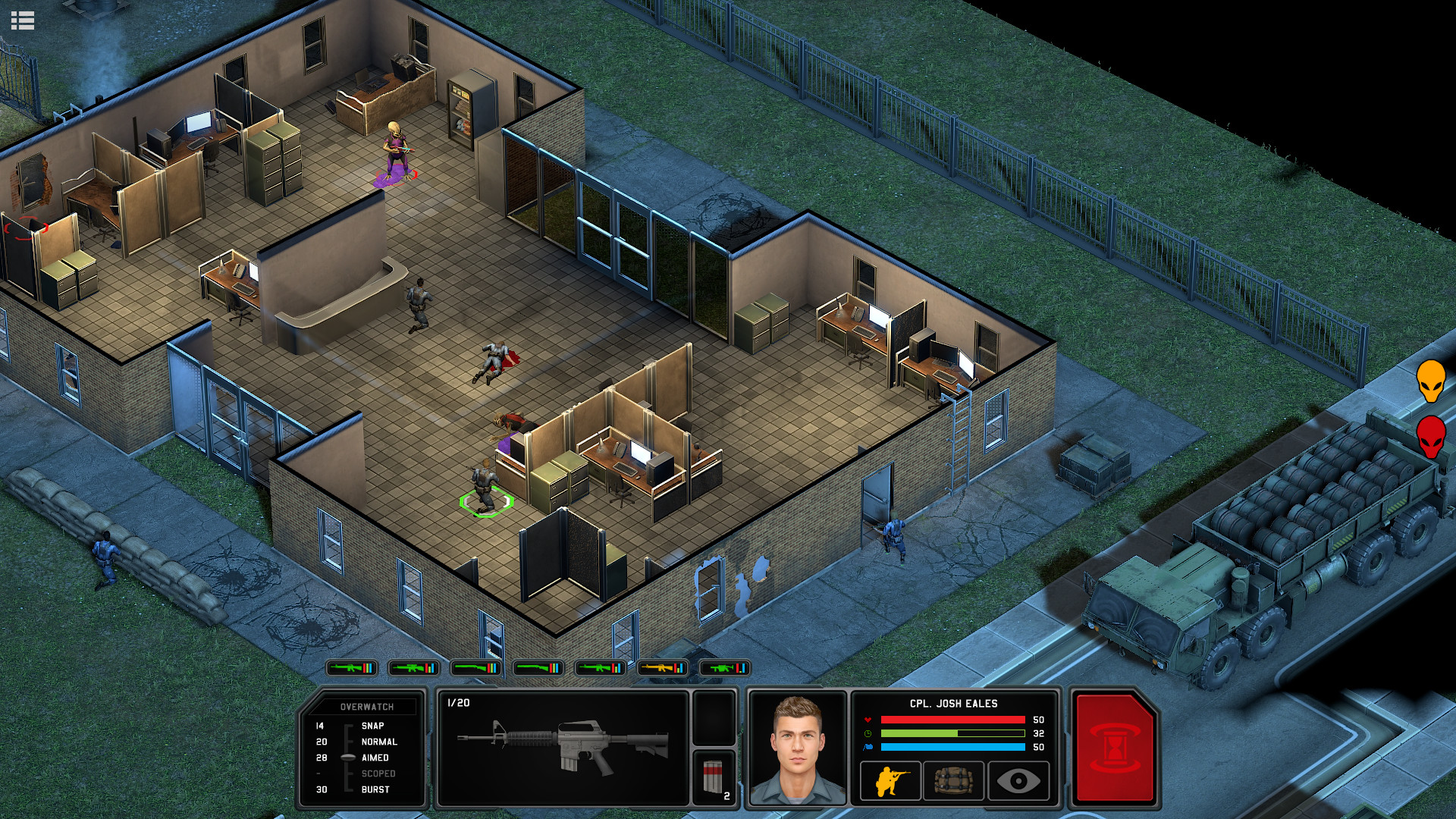
Xenonauts 2 game offers users to take part in a fierce war against an alien invasion. In an alternative universe, aliens invaded Earth at the height of the Cold War, when advanced technology was not yet in service with humans. Humanity turned out to be practically defenseless in the face of an alien threat, and only your team can give a worthy rebuff.
NOTE. Uploaded version: 4 November 2026 [v7.28.0 Build 26252662]. This is Full Release and latest version of game. The game is already Packaged in Installer and ready to run the game after install, read the instruction.
Begin your mission with the construction of a base from the territory of which you can send fighters to intercept or send a command for tasks. Shoot down alien planes with the weapons available to you, and then begin the ground operation. You need to completely clear the territory of the ship’s fall from aliens, after which the remains of an extraterrestrial vessel can be transferred to the base.
Having acquired alien technology, collect scientists to study the materials obtained. Over time, you will be able to combine earthly weapons with alien technology to make it more effective and deadly. Continue your struggle until the end, until you completely eliminate the threat of the takeover of our planet.
MINIMUM:
OS: Windows 10
Processor: i5-4690 (or equivalent)
Memory: 4 GB RAM
Graphics: GTX 770 (or equivalent)
DirectX: Version 12
Storage: 20 GB available space
RECOMMENDED:
OS: Windows 10
Processor: i5-7600 (or equivalent)
Memory: 8 GB RAM
Graphics: GTX 970 (or equivalent)
DirectX: Version 12
Storage: 20 GB available space
Screenshots


Gameplay Trailer
How to Install
- Download the game files through torrent.
- Run the installation file «[gamename].setup.exe», follow the instructions.
- Choose a place on the disk, where the game will be installed.
- Wait for the notification that the game is installed.
- Сlick on the label of the game, Play!


Comments 4