
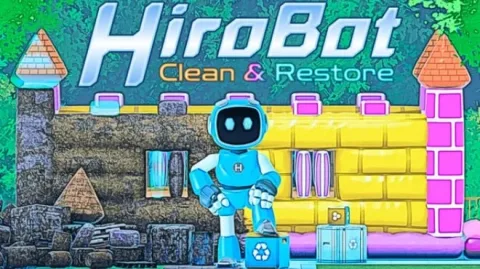
HiroBot Clean and Restore
- Build 26427997
- FREE DOWNLOAD
- TORRENT
- NEW GAME
Game Update History1 updateLast: 07.11.2026 · today
- 07.11.2026Build 26427997current
Data from the MaGamers update log · information may be outdated
About The Game
Take on assignments as a helpful robot named Hiro and aid him in performing various tasks to return grungy locations to pristine condition. Use one of the three tools and the jetpack, and interact with the environment to leave everything sparkling clean. While playing, you can listen to the included, relaxing soundtrack, your own music, a podcast, or just the sound of cleaning.
CLEAN
The Cleaner lets you wash surfaces and objects with powerful cleaning fluid.
RECYCLE
With the Recycler you can remove trash and retrieve displaced objects.
RESTORE
Equip the Restorer to bring displaced objects to their proper place.
USE THE JETPACK
Access out of reach areas with your jetpack.
FEATURES
- 3 expansive assignments + tutorial - at least 4 hours of gameplay
- Satisfying gameplay with no fail states
- Replay assignments as many times as you like
- Good in short bursts and long sessions
- Relaxing soundtrack
Download HiroBot Clean and Restore: Latest Version Build 26427997
NOTE. Uploaded version: 07 November 2026 [Build 26427997]. This is Full Release and latest version of game. The game is already Packaged in ISO File and ready to run after install, read the instruction below.
Minimum:
Requires a 64-bit processor and operating system
OS: Windows 10
Processor: Intel Core i5-2500, AMD Ryzen 3 1200
Memory: 4 GB RAM
Graphics: GeForce GTX 960 4GB, Radeon RX 6400 4GB
DirectX: Version 11
Storage: 2 GB available space
Recommended:
Requires a 64-bit processor and operating system
OS: Windows 10
Processor: Intel Core i5-8600, AMD Ryzen 5 3500
Memory: 8 GB RAM
Graphics: GeForce GTX 1070 Ti 8GB, Radeon RX 7600 8GB
DirectX: Version 11
Storage: 2 GB available space
Screenshots


Gameplay Trailer
How to Install
- The first thing we do is download the game files.
- Unzip the archive to the hard disk. (how to unzip .rar)
- Wait for the unpacking process to finish.
- Start the game «HiroBot.Clean.and.Restore.exe» from game folder.
- The language changes in the menu.


Comments 0