
Edgar Bokbok in Boulzac v1.0 - RAZOR
- 1.0
- FREE DOWNLOAD
- TORRENT
- NEW GAME
About The Game
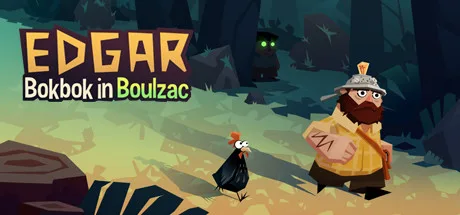
Edgar Bokbok in Boulzac — belongs to the genre of classic adventure games. We will plunge into the story of Edgar, a middle-aged man who travels everywhere with his best friend, the chicken. The hero is a loner and lives on a farm away from prying eyes and a small bulzak. When creating the city in the game, the creators were inspired by French villages. The unexpected disaster that led to the destruction of crops, forcing the eccentric Edgar to leave his house. He goes on a trip to the city of Bulzac, where he discovers a mysterious conspiracy and witnesses further strange events. A surreal adventure provides 2-5 hours of gameplay.The mechanics of playing Edgar Bokbok in Boulzac are very simple. It consists mainly of interacting with objects, solving simple puzzles, and communicating with non-player characters. However, the main element of the game are simple puzzles characteristic of the classic point’n'click adventure games. The game focuses on the narrative side and exploring the surreal world of the game, revealing its secrets and learning the stories of strange characters. Graphically, the places in the game are filled with small details, and the appearance of the characters is sometimes exaggerated, which fits into the comedic setting. During the game, we also hear an atmospheric soundtrack.
MINIMUM:
OS: Windows 7
Processor: Intel i5 Quad-Core
Memory: 4 GB RAM
Graphics: Intel HD 4000
Storage: 2 GB available space
Screenshots


Gameplay Trailer
How to Install
- Download the game files through torrent.
- Run the installation file «[gamename].setup.exe», follow the instructions.
- Choose a place on the disk, where the game will be installed.
- Wait for the notification that the game is installed.
- Сlick on the label of the game, Play!
Download Edgar Bokbok in Boulzac v1.0 - RAZOR
SIZE: 270 MB | Downloads: —
How to get your file — 3 quick steps
VPN detected. Our download does not accept VPN connections. Please disable your VPN to continue.
Re-check
1
Click download
Use any button below
2
Install Opera
On the page that opens
Switch to the tab that just opened — Opera installer is already there. After install, open this page in Opera and click Check install.
Opera not detected. Make sure it's installed and open this page in Opera browser, then click Check install again.
Opera is a free, official browser by Opera Software AS — safe to install. [ Opera Install Guide ]
Alternative Mirrors
Searching mirrors…
Name
Size
Seeds
Leeches


Comments 0